
Caring for aging parents, simplified.

Aging care rarely arrives all at once. It grows with each new medication, each follow-up appointment and each call from the clinic while you are at work.

Kedara brings your parent's medications, visits, documents and care team into one place, with a personal 24/7 assistant that knows their care history.

  • Works wherever your parent lives
  • Siblings and aides on the same page
  • Private and encrypted
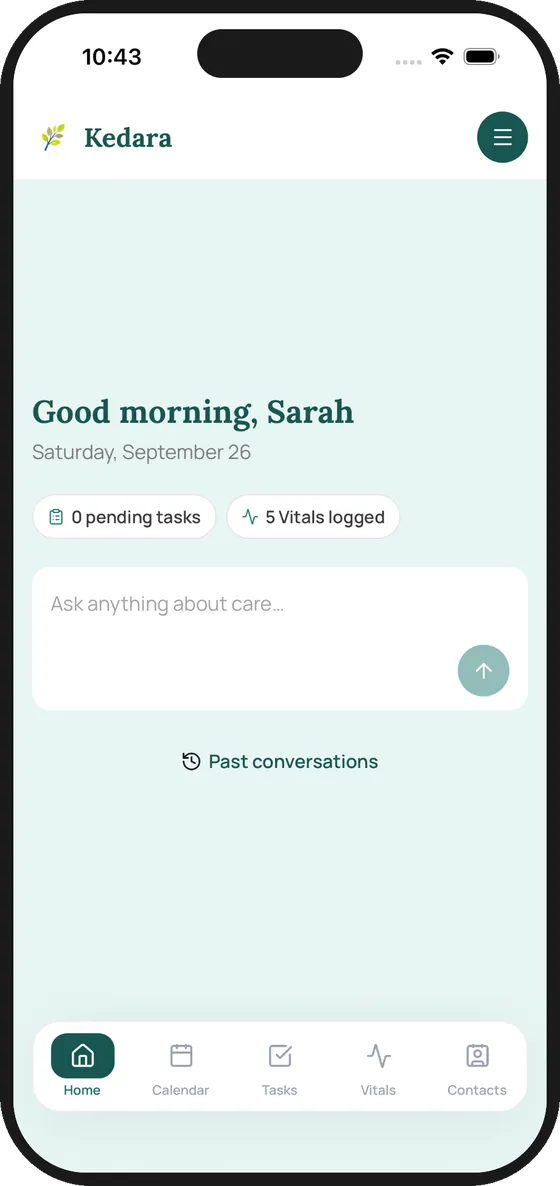
Kedara App home screen: Good morning, Sarah, with 0 pending tasks, 5 vitals logged and an Ask anything about care box

Why we built Kedara

Aging care often lands on one person.

Most families don't decide who will coordinate a parent's care. It falls to whoever lives closest, has the most flexible job, or simply picks up the phone first. From then on, medications, appointments, insurance paperwork and updates to siblings all run through that one person, usually on top of a full-time job.

72%are working
61%spend 5+ hours a week coordinating care
26%are caring from a distance

Kedara survey of 100+ working adults aged 45+ across the US, 2026.

Portrait of Jeane Miller

A week with Kedara

Meet Jeane. She is the one her family counts on.

Jeane Miller · Sr. VP & Family Caregiver

Jeane works full time in San Jose and is the one holding everything together for her parents in Fremont. Her brother David helps from Seattle, and a home health aide, Maria, comes three afternoons a week.

Before Kedara, her parents' care lived in Jeane's texts, her inbox and her head. Here is one ordinary week, with the whole family working from the same place.

Illustrative family. Names and details are examples.

Monday, 7:10 am

Before her first meeting

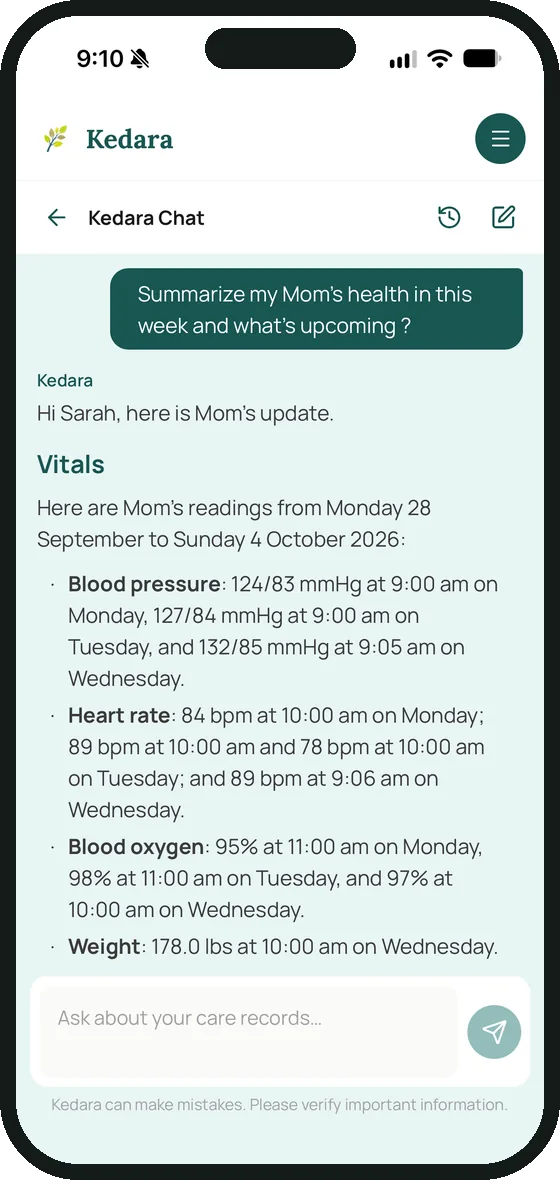
Jeane asks what Mom has coming up. The answer comes from the family's own records: Wednesday's cardiology follow-up, Maria's visit and last week's readings.
Tuesday, 3:40 pm

Everyone does their part

Maria logs Mom's blood pressure and lunch during her visit. David calls the pharmacy from Seattle and checks it off. Jeane sees both without sending a single text.

Wednesday, 10:20 am

In the waiting room

When the nurse asks about Mom's recent readings and her last hospital stay, Jeane opens the summary she saved on Monday and the August discharge summary. She doesn't have to dig through her email.

What the app does

Clarified, simplified, personalized.

Kedara Chat answering a request to summarize Mom's week, listing blood pressure, heart rate, blood oxygen and weight readings

Caregiving Clarified

Get Answers from your family's own records.

The assistant reads the vitals, tasks, appointments, contacts and care profile your family has entered, and summarizes them when you ask. Save a summary and bring it to the next appointment.

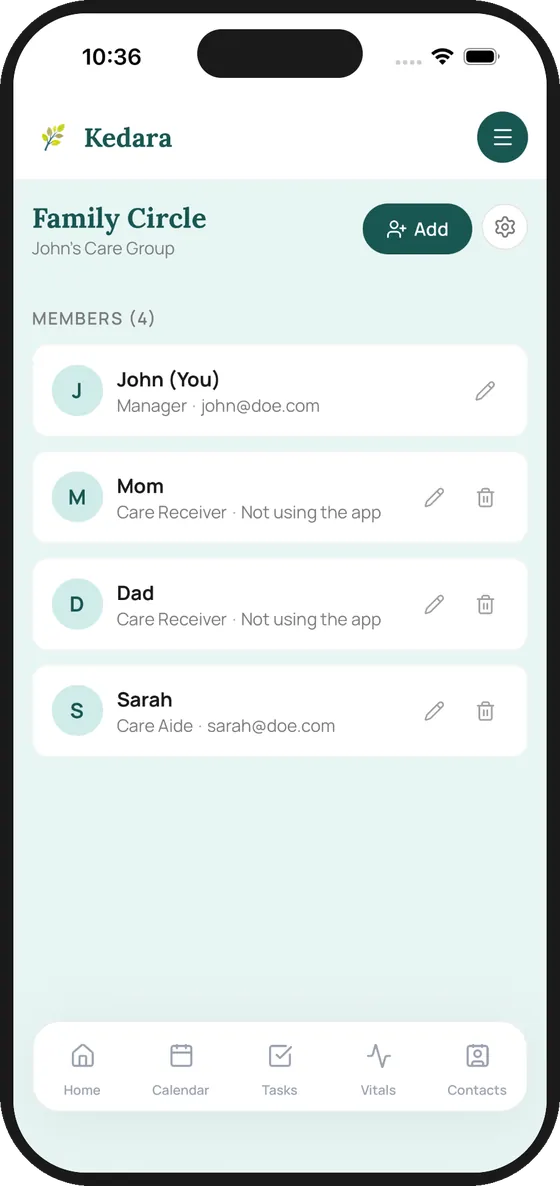
Family Circle screen listing John as Manager, Mom and Dad as Care Receivers not using the app, and Sarah as Care Aide

Caregiving Simplified

Bring the whole family into one place.

Invite siblings, a spouse and the aide you've hired. Each person has a role, so everyone works from the same plan. Your parent can be part of the circle without ever using the app.

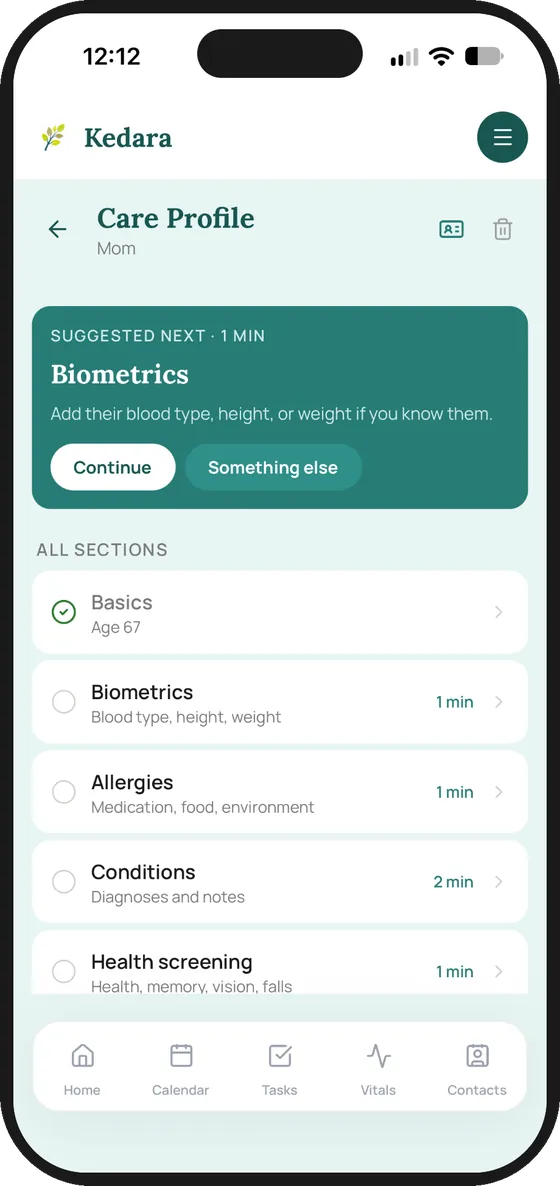
Care Profile for Mom with a suggested next step and sections for basics, biometrics, allergies, conditions and health screening

Caregiving Personalized

Their whole care story, in one profile.

A guided intake covers allergies, conditions, routines and health screening, a minute or two per section. Stop whenever you need to and pick up where you left off. Everything the assistant knows about your parent starts here.

Features

One app for your family's care.

Shared calendar

Appointments everyone can see.

Tasks and reminders

Shared to-dos, with reminders.

Vitals and meals

Logged once, seen by everyone.

Secure documents

Encrypted and in one place.

Care contacts

Every number, one tap away.

Your personal 24/7 assistant

Answers from your family’s records.

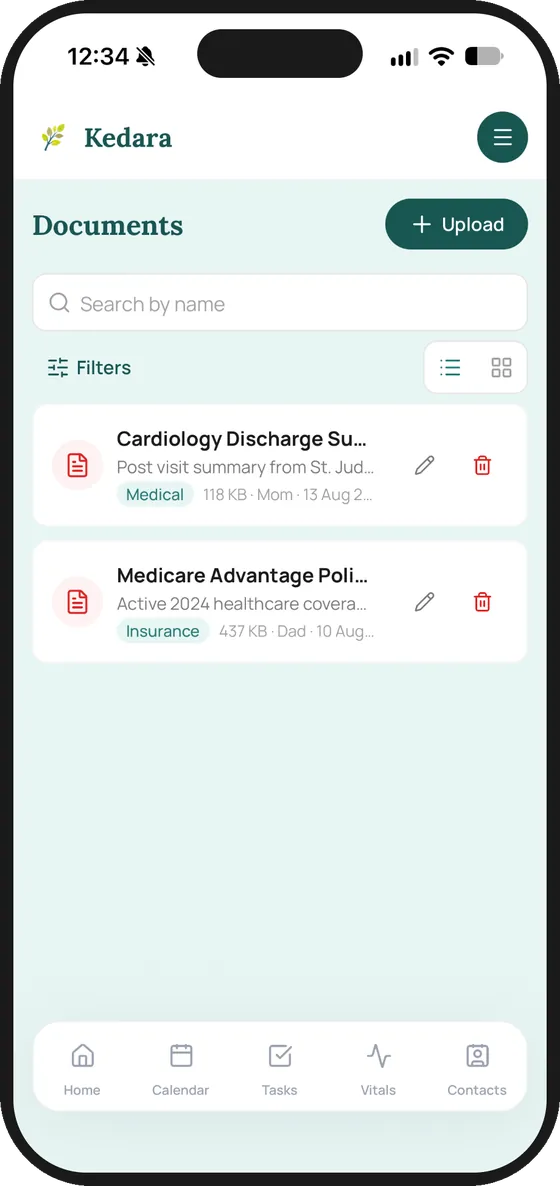
Documents screen with a cardiology discharge summary for Mom and a Medicare Advantage policy for Dad
Documents
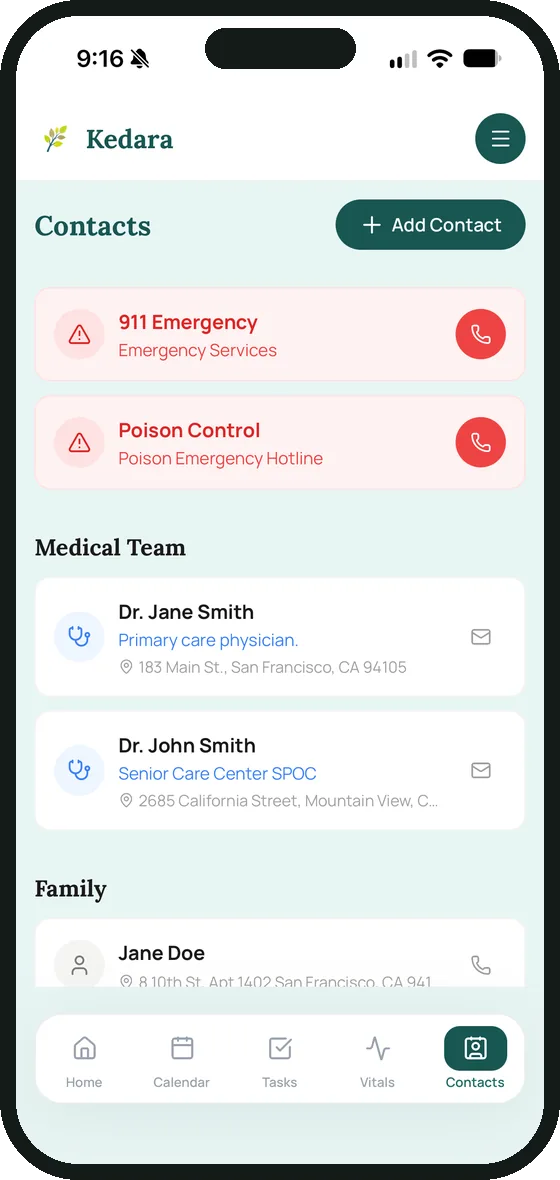
Contacts screen with 911, Poison Control, a primary care physician and family contacts
Contacts

The difference

Before Kedara, and with it.

Before

  • Care details scattered across group texts, spreadsheets, notes apps and memory.
  • Siblings working from last week's information.
  • Hunting through email for the discharge summary at the clinic desk.
  • Questions about your parent's care at midnight, with no one to ask.

With Kedara

  • One shared place the whole family and the care aide can see.
  • Everyone sees the same tasks, appointments and vitals.
  • Documents stored securely and ready on your phone.
  • Your personal 24/7 assistant answers questions about your parent's care.

Founding Families

Help shape Kedara from its first release.

Join a small group of Bay Area families using the Kedara App this fall, and help us shape what comes next.

What you get

  • Early access on iPhone or Android
  • A setup call with our team
  • A direct line to the people building it
  • A say in what we build next

What we ask

  • Use it for your parent's aging care for three months
  • Give us regular feedback on features

Apply to be a Founding Family

We'll handle your information with care. Privacy Policy.

Privacy and trust

Your family's information stays with your family.

Care details are personal. Here is how the app handles them today.

Encrypted, family by family

Care records and documents are encrypted, and each family group has its own keys.

You decide who's in

Only the people your family invites can see your parent's care.

Your own history stays yours

Your conversations with the assistant aren't visible to other members of the circle.

Delete when you choose

Delete your account or your family group from the app. Read the app Deletion Policy.

What Kedara is not. Kedara does not provide medical advice, does not employ or place caregivers, is not a home care agency. Kedara helps your family find services near you, organize and coordinate care.

Questions

How is Kedara App different from a shared calendar or a notes app?

Most families coordinate care across group texts, shared calendars, spreadsheets and notes. Kedara App brings all of it into one place, built for care. Medications, appointments, vitals, tasks and documents sit together, and everyone in the care circle sees the same up-to-date information, including care workers you hire. The built-in AI assistant knows your family’s care information and draws on the same local resource knowledge as Kedara Guide. You can ask it what’s coming up this week, or ask it to add a task or appointment, which it creates after you confirm.

Is there a mobile app?

Yes. Kedara App works in the browser and as a native app for iPhone and Android. Families in our Founding Families Program are using it now by invitation. The app will be available to download from the Apple App Store and Google Play Store shortly. Apply to join the Founding Families Program. Kedara Guide does not need an app. It works in the browser on any phone or computer.

Does Kedara App help caregivers with their own needs?

Not yet, but it is on our roadmap. Caregivers need support too. In our in-person and online surveys, families asked for help with respite, mental health, menopause and longevity care. We plan to bring partners onto Kedara and add tracking and guidance so caregivers can manage their own health and life. This is part of our longer-term goal of supporting longevity as well as aging care.

I'm caring for more than one person, or I have health needs of my own. Can Kedara handle that?

Yes. A care circle can include more than one person receiving care, such as both parents, or a parent and an aunt. Medications and vitals are recorded for each person receiving care. Tasks are assigned to the caregivers who do them, whether that is several family members or one primary caregiver. We are also improving support for people who manage their own care with help from a relative, such as an adult child who lives farther away.

Who can see my parent's information? Does every family member get access?

The person who creates the care circle becomes the manager and decides who joins it. Access is by invitation, not by family relationship, so each family can include whoever fits their situation: one adult child, several siblings, a niece, a partner, a close friend or a paid care worker. Each person has a role, such as manager, caregiver or care receiver, which decides what they can see and change. Your conversations with the AI assistant are private to you. We are adding fine grained role-based access control, so each person sees only what they need. For example, a paid care worker could see the tasks for her shift, and a sibling in another state could see the schedule without the full health record.

Can a care circle include spouses, partners or friends? What about other kinds of caregiving?

Yes. A care circle is a group of invited people, not a family tree, so it can include spouses, partners and friends. Our focus is aging care: caring for parents, an older sibling, a spouse or another older relative. Our knowledge base and AI are built for aging care questions. We know caregiving also includes chronic illness, cancer, immune conditions and recovery from accidents. We will consider these situations once we serve aging care families well.

How are vitals recorded? Do you provide wearables?

A person enters vitals in Kedara App. This can be the person receiving care, if they are able to, or a family caregiver or care worker on their behalf. Everyone in the care circle can then see the readings in one place. We do not provide wearables today. Connections to health apps and wearables are on our roadmap, so readings can be added automatically.

What documents can I store?

You can store the documents your family needs to coordinate care, such as power of attorney, insurance cards, a driver’s license, or onboarding information for hired care workers. Everyone in your care circle can view them. Only managers can upload or delete them. Coming soon: • Role-based access, so you can choose who sees each document. • AI assistant support for sorting your documents and using them to answer questions about your family’s care.

How do appointments get into the app? Does it connect to my calendar?

A family member enters appointments today. Calendar connections for Google, Apple and Outlook are on our roadmap, along with connections to other health apps, so appointments stay in sync both ways.

How are medications tracked, including dose changes, side effects and effectiveness?

Today, medication is entered by hand as a task. There are no separate fields yet for dose, frequency, prescriber, side effects or refills. There is no pharmacy or e-prescribing connection, so the app knows about a change only if someone enters it. Better medication tracking and pharmacy connections are on our roadmap. Kedara is a consumer app, not a medical provider, so we will rely on information from health providers to keep this accurate and easy for your family and care workers to find.

Will Kedara help me understand what the health information means and what to ask the doctor?

Kedara is not a medical provider and does not give diagnosis or treatment advice. We are building an AI assistant in Kedara App that can summarize your family's information and point you to trusted medical sources, so you can prepare questions for the doctor. It will run on a secure, encrypted platform, and its conversations will be logged for audits.

What is the difference between Kedara Guide and Kedara App?

Kedara Guide helps you find what exists near you and whether your parent is likely to qualify. It is free and covers the nine Bay Area counties. There is no account and no app to install. It works in any phone or computer browser. Ask in your own words, such as "my mother needs someone a few hours a day in Fremont" or "what does the county offer for respite." Guide answers with named local programs, agencies and senior services, and what we know about their eligibility, cost and languages served. Guide does not ask who you are and is not designed to collect health information about you or your parent. Kedara App helps your family keep care coordinated week to week. It is where your family's care circle lives: a shared timeline, tasks, appointments, vitals, and documents such as power of attorney and insurance cards. Its AI assistant draws on your family's information and on local resources. Kedara App is available now to families in our Founding Families Program.

Is Kedara a medical provider?

No. Kedara builds software that simplifies aging care for families. Kedara Guide helps you find local aging care resources, and Kedara App helps your family coordinate care. Neither one gives medical diagnosis or treatment. For questions about your parent’s health, please talk to their doctor, primary care physician or specialist.

What stage of development is Kedara in?

Kedara Guide has been fully live since August 2026. It is free for all families across the nine SF Bay Area counties. We keep improving it based on the questions families ask and the feedback they send. Kedara App is in early access. A small group of invited families is using it through our Founding Families Program, and their feedback shapes what we build next. We are onboarding families slowly so we can support each one closely. Apply to join the Founding Families Program.

Does Kedara work in languages other than English?

Kedara Guide and Kedara App are in English today. We are building a multilingual voice interface over the next three to six months. Kedara Guide can already help in one way. It knows which languages each provider or program serves, so an English-speaking adult child can find a Cantonese-speaking home care agency for their mother today. If you or your parent need help in another language now, call 211. It offers free interpreters in more than 150 languages. This matters to us. Kedara began with our founder's family caregiving across continents, with family members who speak languages other than English.

How can my parent use Kedara if they don't have a computer, tablet or smartphone?

Most families use Kedara Guide on behalf of a parent or relative, so your parent does not need a device of their own unless they would also like to search and find answers on their own. Kedara Guide needs no app and no account, and it works in the browser on any phone or computer. For people with no device at all, we will explore partnerships with local community nonprofits, as well as text messaging and a voice assistant over a regular phone line.

What if I have a question not listed here?

We'd love to hear from you. Please send any questions to [email protected] and a member of our team will reply within 48 hours.

Read our Privacy Policy and Kedara App Terms of Service.